SMS Alerts & Consent
How Talarga's text-message security alerts work — what you'll receive, how to opt in, and how to opt out at any time.
About this program
Talarga (operated by STL Innovation LLC) sends transactional medical-identity security alerts by SMS to subscribers who choose to receive them. We text you only about activity on your own account — for example, a possible unauthorized medical claim — so you can review, confirm, or dispute it. We never send marketing or promotional texts through this program.
How you opt in
SMS alerts are optional. During account onboarding, and at any time under Settings → Notifications, you can turn on text alerts by checking a box that is unchecked by default. You can create an account, subscribe, and use every Talarga feature without enabling SMS — consent to receive texts is never a condition of any purchase or of using the service.
How it appears during sign-up
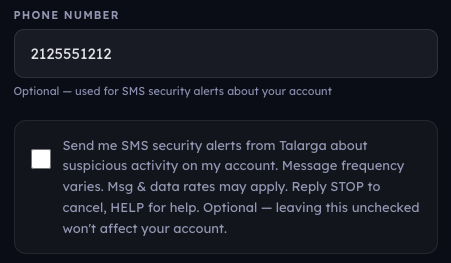
How the SMS consent opt-in appears during Talarga sign-up — unchecked by default, optional, and never required to create an account.
What to expect
- Message type: transactional security / fraud alerts about your account.
- Message frequency: varies — we only text when there is activity to report.
- Cost: message and data rates may apply.
- Opt out: reply STOP at any time to unsubscribe; you'll get one confirmation message.
- Help: reply HELP for assistance, or contact us.
Example messages
- “Talarga Alert: possible unauthorized medical claim detected on your account. Review it now in the app. Reply STOP to opt out, HELP for help.”
- “Talarga: a new high-severity alert is ready. Open the app to review and confirm or dispute. Reply HELP for help, STOP to unsubscribe.”
Privacy & terms
Your mobile number and consent are handled in accordance with our Privacy Policy and Terms of Service. We do not sell your information, and we do not share your mobile opt-in or phone number with third parties for their own marketing or promotional purposes.